
Sentiment analysis is one of the most practical applications of artificial intelligence and natural language processing (NLP). It allows us to automatically evaluate whether a piece of text expresses a positive, negative, or neutral sentiment. Businesses, creators, and data analysts use sentiment analysis to understand audience reactions, monitor brand reputation, and interpret feedback.
Before we start, if you are looking for help with a n8n project, we are taking on customers. Head over to our n8n Automation Engineer page.
What Is Sentiment Analysis?
Sentiment analysis is a technique within Natural Language Processing (NLP) that identifies emotional tone or opinion in a text. It determines whether the expressed sentiment is positive, negative, or neutral.
Common use cases include:
Analyzing customer reviews to gauge satisfaction
Monitoring social media for brand sentiment
Evaluating support messages or feedback forms
Tracking public opinion on topics or products
In n8n, the sentiment analysis node simplifies this process by leveraging AI models that classify input text into defined sentiment categories.
Getting Started in n8n
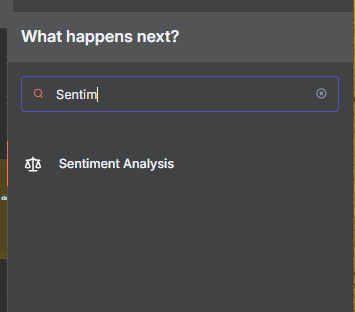
Once you’re in your n8n workspace, there are two ways to locate the Sentiment Analysis node:
Click the + icon and search for “Sentiment”, or
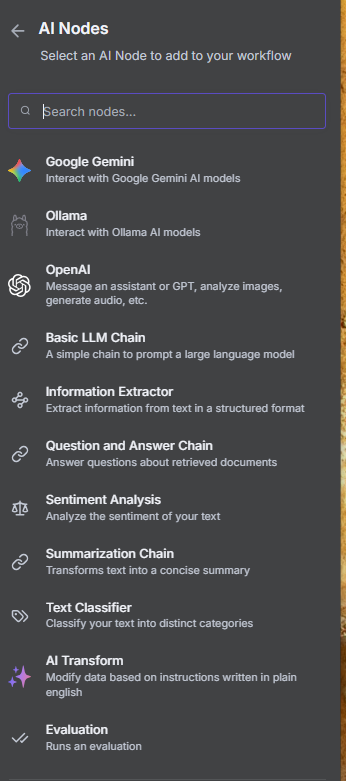
Navigate to AI → Sentiment Analysis
The node’s description reads: “Analyze the sentiment of your text.”
Key Configuration Options
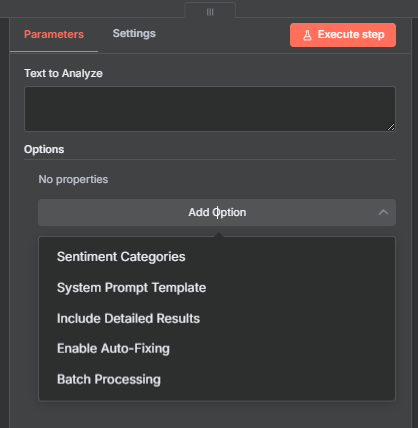
When you set up the node, you’ll observe a few crucial things:
Text to Analyze: The main input area where you can paste text or link to text from an earlier node.
Sentiment Categories: This tells the model what kinds of sentiment labels (such positive, negative, or neutral) it can give.
System Prompt: The instruction that tells the AI how to read text (may be changed).
Detailed Results: Gives you more information, such as strength and confidence scores.
Turn on Auto-Fixing: This helps the model fix itself when the data is wrong.
Batch Processing: Allows processing numerous texts simultaneously.
How Sentiment Analysis Works in n8n
This node’s primary function is text classification; it gives a text a label according to its emotional tone.
Three categories are present by default: negative, neutral, and positive.
Let’s look at some practical examples.
Example 1: Basic Sentiment Detection
In this example, we’ll analyze three sample comments.
Negative Example:
“I can’t stand Ryan. He says ‘right’ too many times in his videos.”
→ Result: Negative
→ Strength: 0.85
→ Confidence: 0.93Positive Example:
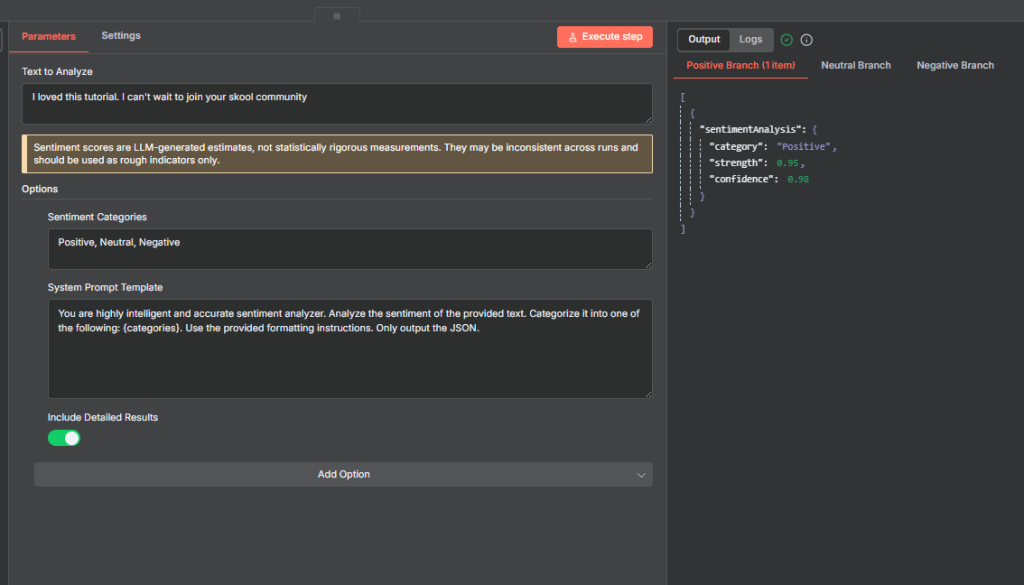
“I love this tutorial! I can’t wait to join your school community.”
→ Result: Positive
→ Strength: 0.95
→ Confidence: 0.96Neutral Example:
“The video was decent. It covered the basics, but I wish it went into more detail.”
→ Result: Neutral
→ Strength: 0.50
→ Confidence: 0.95
Full flow.
Note, we add the OpenAI chat model. We can use any chat model provided in n8n but for this example I made use of OpenAi Chat model
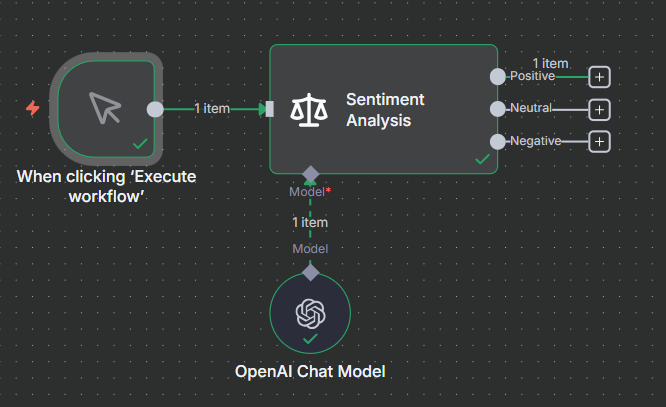
These confidence scores show how certain the AI is about its classification, while strength measures how strongly that sentiment is expressed.
Example 2: Custom Sentiment Categories
You’re not limited to positive, negative, and neutral.
You can define your own sentiment categories by modifying the Sentiment Categories field.
For instance:
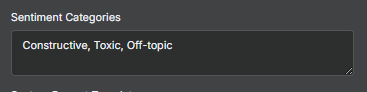
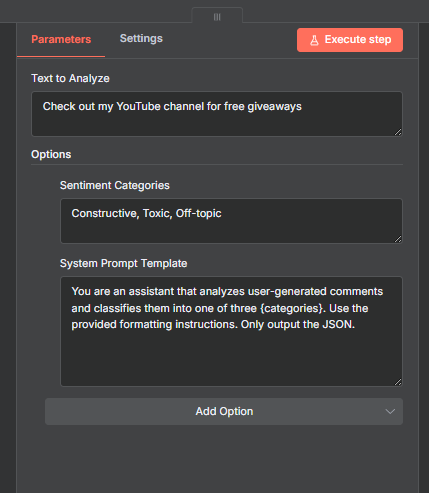
Then, update the System Prompt accordingly:
“You are a system that analyzes user-generated comments and classifies them into one of the following categories: constructive, toxic, or off-topic.”
Testing Custom Categories
“I think the new node is great, but I wish there was an option to calculate the median.”
→ Constructive“You clearly have no idea what you’re talking about.”
→ Toxic“Check out my YouTube channel for free giveaways!”
→ Off-topic
full flow
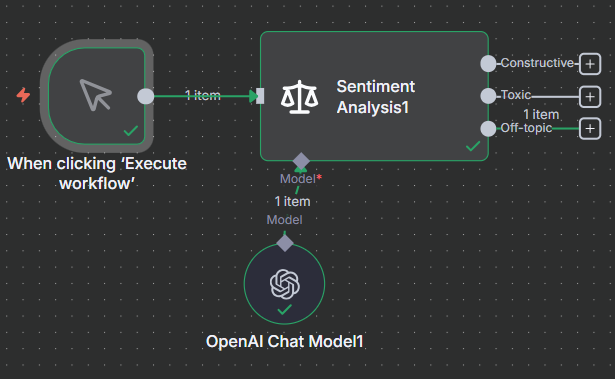
This flexibility lets you tailor sentiment analysis to your platform, be it for moderation, feedback sorting, or customer engagement.
Expanding Beyond Defaults: Other Use Cases
Depending on your project, you could define categories such as:
General-purpose alternatives
Useful when you want a bit more nuance than Positive/Neutral/Negative:
Very Positive / Positive / Neutral / Negative / Very Negative (5-point scale)
Optimistic / Neutral / Pessimistic
Supportive / Indifferent / Critical
Favorable / Mixed / Unfavorable
Emotion-based categories
If you want to capture how people feel, not just the polarity:
Joy / Anger / Sadness / Fear / Disgust / Surprise → (classic Ekman 6)
Trust / Anticipation / Joy / Surprise / Fear / Sadness / Disgust / Anger → (Plutchik’s Wheel of Emotions)
Happy / Frustrated / Concerned / Excited / Disappointed / Confused
Love / Hate / Calm / Anxious / Content / Upset
Customer feedback / business context
Often used in product reviews, NPS surveys, or customer service:
Promoter / Passive / Detractor (NPS model)
Satisfied / Neutral / Dissatisfied
Delighted / Pleased / Unhappy / Angry
Praise / Complaint / Suggestion / Question
Social media / online discussions
Adapted for online tone or stance detection:
Agree / Disagree / Neutral
Support / Oppose / Irrelevant
Sarcastic / Genuine / Hostile / Friendly
Constructive / Toxic / Off-topic
Task-specific (domain-dependent) examples
You can tailor categories to match your dataset’s purpose:
For political stance → Pro / Neutral / Anti
For product launch sentiment → Excited / Curious / Skeptical / Angry
For finance news → Bullish / Neutral / Bearish
For healthcare feedback → Reassured / Concerned / Angry / Grateful
Advanced Sentiment Analysis with Hugging Face
While n8n’s built-in node is versatile, Hugging Face provides domain-specific sentiment models trained on large, specialized datasets, offering higher accuracy for niche applications like finance, law, or social media.
Why Use Hugging Face?
Hugging Face hosts thousands of pre-trained NLP models that specialize in:
Social media sentiment (e.g., tweets and posts)
Financial reports and market analysis
Legal and healthcare documentation
For instance, if you’re analyzing stock news sentiment, a financially trained model will outperform a general-purpose one.
Integrating Hugging Face with n8n
To connect Hugging Face, use the HTTP Request node and a Hugging Face API key.
Follow these steps:
Go to huggingface.co/models.
Filter by Task → Text Classification.
Search for “Sentiment.”
Choose a suitable model (e.g., one trained on Twitter or financial text).
Copy its model ID and construct your request URL:
https://router.huggingface.co/hfinference/models/{MODEL_NAME}
Create a POST request in n8n:
Body parameter:
{"inputs": "Your text here"}Header:
Authorization: Bearer YOUR_HF_API_KEY
Example 3: Social Media Sentiment Model
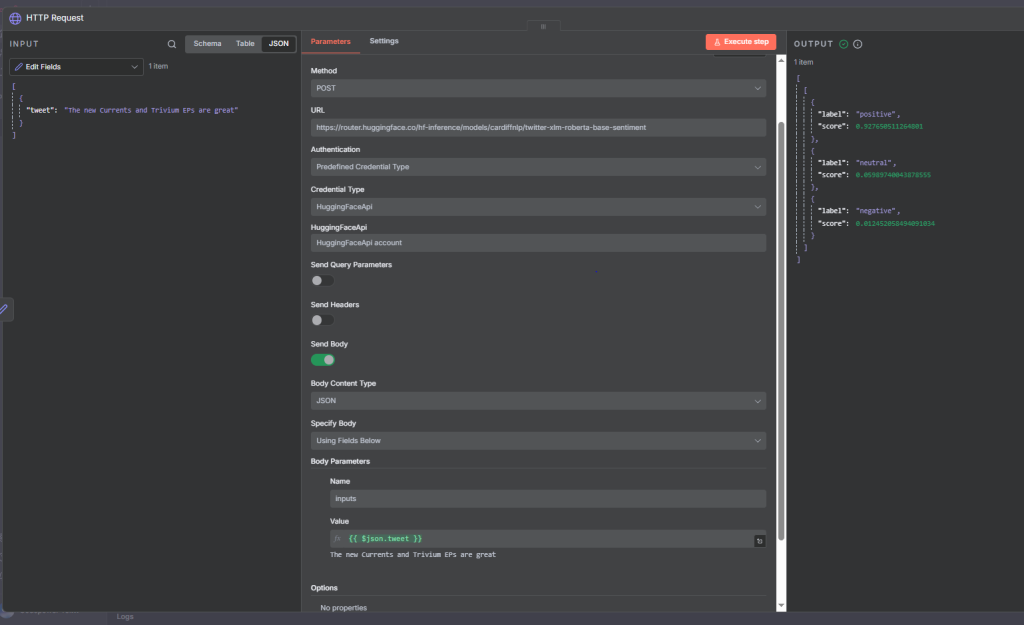
Let’s use the Twitter XLM-Roberta model, trained on 198 million multilingual tweets.
Request Example:
					POST:
https://huggingface.co/cardiffnlp/twitter-xlm-roberta-base-sentiment
Sample Input:
“The new Currents and Trivium EPs are great!”
					[
  {"label": "positive", "score": 0.92},
  {"label": "neutral", "score": 0.05},
  {"label": "negative", "score": 0.01}
]
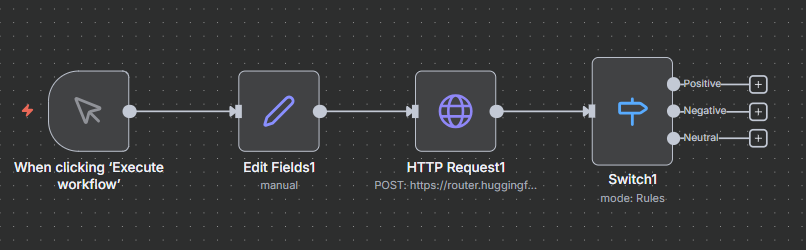
You can then use a Switch node in n8n to route outputs:
If positive score > 0.6 → Positive branch
If negative score > 0.6 → Negative branch
Otherwise → Neutral
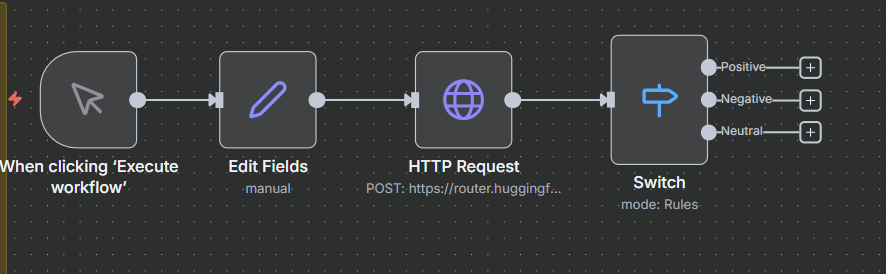
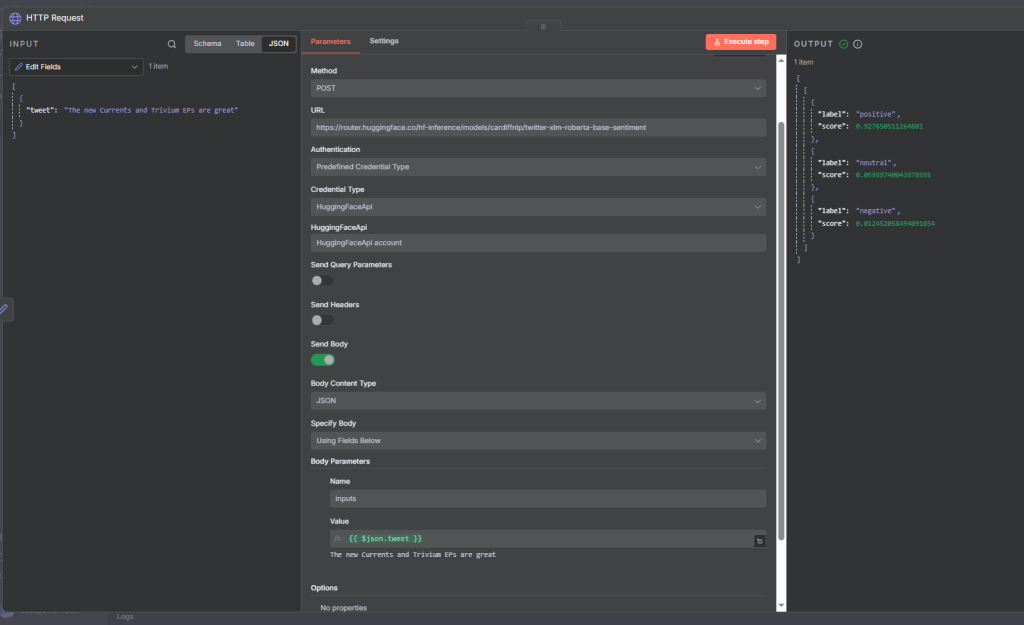
This setup lets you automate responses or actions depending on sentiment level.
Example 4: Financial Sentiment Model
For financial documents, use FinBERT or other finance-specific models like:
https://router.huggingface.co/hf-inference/models/mrm8488/distilroberta-finetuned-financial-news-sentiment-analysis
Sample Text:
“The company reported record quarterly earnings exceeding analyst expectations by 15%, driven by strong demand.”
					[
  {"label": "positive", "score": 0.96},
  {"label": "neutral", "score": 0.03},
  {"label": "negative", "score": 0.01}
]
Such models are fine-tuned on financial phrase banks, making them ideal for analysts, investors, and business monitoring systems.
Full flow
Best Practices for Sentiment Analysis in n8n
Always customize your system prompt to match the tone and language of your data.
Use domain-specific models for improved accuracy.
Implement threshold tuning (e.g., set minimum confidence for routing).
Combine with Switch nodes or If nodes for dynamic automation.
Store or visualize results in databases or dashboards for ongoing analysis.
Final Thoughts
Sentiment analysis is a foundational AI technique that can transform how you understand users and data.
With n8n’s Sentiment Analysis node, you can quickly classify emotions in text, while Hugging Face integration allows you to go deeper, using models trained for your specific domain.
Whether you’re tracking brand perception, moderating content, or analyzing financial news, combining n8n automation with Hugging Face intelligence unlocks powerful, data-driven insights.
Thank you for reading this article. Make sure to check out our other n8n content on the website. If you need any help with n8n workflows we are taking on customers so reach out
