
Example 1
isalpha
while True:
    name = input("Enter the player's name: ")
    if name.isalpha() and len(name) > 1:
        break
    else:
        print("Invalid name. Please enter a valid name with alphabetic characters only.")
print(f"The player's name is {name}.")
Example 2
integer
while True:
    try:
        home_runs = int(input("Enter the number of home runs: "))
        if 0 <= home_runs <= 80:
            break
        else:
            print("Please enter the correct number of home runs (0-80).")
    except ValueError:
        print("Invalid input. Please enter a whole number.")

print(f"The number of home runs is {home_runs}.")
Example 3
float
while True:
    try:
        average = float(input("Enter the player's batting average (0.000 - 0.500): "))
        if 0.000 <= average <= 0.500:
            break
        else:
            print("Please enter a batting average between 0.000 and 0.500.")
    except ValueError:
        print("Invalid input. Please enter a number between 0.000 and 0.500.")
print(f"The player's batting average is {average}.")
Example 4
custom invalid characters not using isalpha
invalid_chars = ('.', '/', '!', '@', '#', '1', '2', '3')
while True:
  name = input("Enter the player's name: ")
  invalid_chars_count = 0

  for char in invalid_chars:
    if char in name:
      invalid_chars_count += 1

  if invalid_chars_count > 0 or len(name) < 1:
    print()
    print("invalid!")

  else:
    break
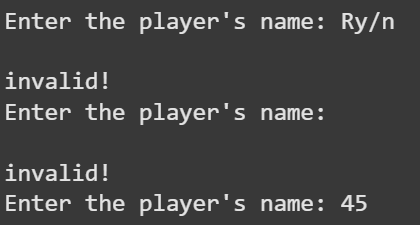
print (name)
Example 5
date example
from datetime import datetime
Define the valid months for the baseball season
February (2) to October (10)
valid_months = list(range(2, 11))
while True:
    game_date_input = input("Enter the baseball game date (MM/DD/YYYY): ")

    try:
        # Attempt to parse the date input
        game_date = datetime.strptime(game_date_input, "%m/%d/%Y")

        # Check if the month of the date is within the valid range
        if game_date.month in valid_months:
            print(f"Valid date: {game_date.date()}")
            print("Thank you! The game date is set.")
            break
        else:
            print("The date must be between February and October.")
    except ValueError:
        print("Invalid date format. Please enter the date in MM/DD/YYYY format.")

