




We are going to be looking at the datatypes in Python
The data types in Python includes.
Lets start with numbers.
we have the int, float, complex and bool
Example 1 Integers
the type() function is used to return the type of value of 11, which is an interger(int).
An int in Python is a whole number, it has no decimal point
type(11)
type(11 + 11)
isinstance(11, int)
Example 2 Float
Here we check the type of 55.5 and it returns a float.
A float in python is a number that has a decimal point
type(55.5)
type(7/3) #can start with two ints and move to a float
Example 3 Complex Numbers
type(6 + 2j)
Example 4 Booleans (True or False)
Here, True is a Boolean value in Python. Booleans represent truth values, True or False.
type(True)
type(33 < 11)
Example 5 None
type(None)
Example 6 range
type(range(1,11))
Example 7 Strings
‘koufax’ is a string (str), which means a sequence of characters(text) in Python
name = 'koufax'
type(name)
name[0]
The type remains a str
type(name[0])
This uses slicing to get characters from index ‘0’ up to (but not including) index 3 of the string ‘koufax’
name[0:3]
This does same thing as the previous code.
When the start index is left out, Python starts from the beginning of the string.
name[:3]
type("Sandy")
Strings can also have triple quotes
type(
"""
Sandy
Koufax
"""
)
Example 8 Lists
A list in Python is an ordered collection of items, which can be of any data type.
here we have a list called “list1” and it contains three integers.
List are muable, meaning you can change their contents.
They are written using square brackets.
list1 = [5, 2, 3]
type([5, 2, 3])
#list with multiple data types
type([5, 'Walter'])
This is a nested list, meaning a list of lists.
The outer structure is still a list in Python
multi_list = [[5, 2, 3], ['Walter', 'Johnson']]
type(multi_list)
print(list1)
This accesses the first item in the list. index 0 gives the first element.
list1[0]
This slices the list to get elements from the start up to (but not including) index 2.
list1[:2]
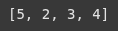
The append() method or function modifies the original list by adding one item at the end.
list1.append(4)
print(list1)
Example 9 tuples
A tuple is an ordered, immutable collection of items.
It is written with parenthesis ().
It cannot be chnaged after creation unlike lists.
It can contain diffferent data types.
tuple1 = (1, 4, 5, 6)
type(tuple1)
Example 10 sets
set_dup = {1,1, 2}
print(set_dup)
type(set_dup)
sets1 = {1, 3, 4}
sets2 = {11, 3, 5}
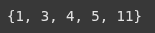
This prints the union of two sets.
the “|” operator combines all unique elements from both sets
print(sets1|sets2)
Tis prints the intersection of two sets.
The “&” operator returns only the elements common to both sets.
print(sets1 & sets2)
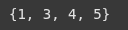
This prints the difference between the two sets.
It returns items that are in set1 but not in set2.
print(sets1 - sets2)
This prints the symmetric difference of two sets.
The “^” operator returns elements that are in either set, but not in both.
print(sets1 ^ sets2)
The add() method inserts a new element into the set if it’s not already there.
sets1.add(5)
print(sets1)
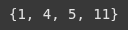
This removes the element “3” from the set sets1.
Note:
if 3 exists, it is removed.
if 3 does not exist, Python raises a KeyError
sets1.remove(3)
print(sets1)
Example 11 dictionaries
A dictionalry stores key-value pairs.
Int hsi example,
“cricketer” is the key,
“kohli” is the value
cricketer = {'cricketer': 'Kohli'}
type(cricketer)
.items() methid gives us a view of the dictionary’s key-value pairs as a list of tuples.
cricketer.items()
.values() method gives a view of all the values in the dictionary, without the keys.
cricketer.values()
.keys() method gives a view of all the keys in the dictionary.
cricketer.keys()
This accessess the value associated woth the key “cricketer” in the dictionary.
cricketer['cricketer']
The update() method chnages the value of the existing key “cricketer” from “Kohli” to “Dhoni”.
note:
If the key didn’t exist, it would be added instead.
cricketer.update({'cricketer': 'Dhoni'})
print(cricketer)
