
When working with real world data, you’ll often have to deal with categorical information. This can be a problem when working with Machine Learning models as most cannot use it.
Instead, Data Scientists and Machine Learning engineers need to convert this into a numerical format. This is where the Ordinal Encoder in Scikit-Learn can help.
If you want to watch our video tutorial based on this lesson, it is embedded down below.
Ordinal Encoding with Pandas and scikit-learn
The example we will walk through in this tutorial is using Ordinal Encoder to specify a city size. The data we will work with has size listed as Small, Medium, and Large. But the goal will to encode them to be 0, 1, and 2.
Start by importing in pandas and OrdinalEncoder
					import pandas as pd
from sklearn.preprocessing import OrdinalEncoder
This dictionary above will be what we use for making the basis of a pandas dataframe.
d = {'sales': [100000,222000,1000000,522000,111111,222222,1111111,20000,75000,90000,1000000,10000],
'city': ['Tampa','Tampa','Orlando','Jacksonville','Miami','Jacksonville','Miami','Miami','Orlando','Orlando','Orlando','Orlando'],
'size': ['Small', 'Medium','Large','Large','Small','Medium','Large','Small','Medium','Medium','Medium','Small',]}
To convert the dictionary to a dataframe, use ps.DataFrame and pass in the data as a paramater. Once this is completed, let’s take a look at the first 5 rows using head.
df = pd.DataFrame(data=d)
df.head()
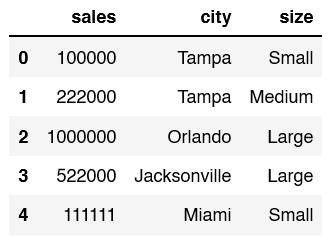
The next step is to find out the unique values for the colum we are about to encode.
df['size'].unique()

Now we create a list called sizes. We use all of the unique values. This is needed for when we create out Ordinal Encoder.
sizes = ['Small', 'Medium', 'Large']
Now we create our Ordinal Encoder. As a parameter we pass in the sizes. After it’s created we need to fit and transform the column.
To see what this will look like we can print it out.
					enc = OrdinalEncoder(categories = [sizes])
Print(enc.fit_transform(df[['size']]))
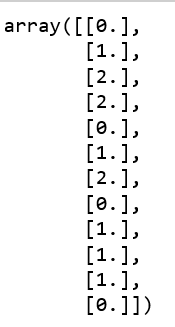
We have to assign the fit_transform back to the dataframe size column. Once we do that use head to see what the final dataframe looks like.
df['size'] = enc.fit_transform(df[['size']])
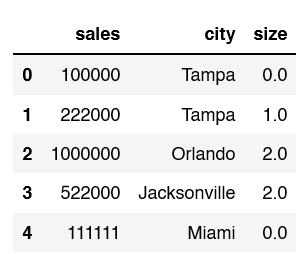
The size column is now filled with the values of 0, 1, and 2 instead of small, medium, and large.
