
































Python Regular Expressions

Table of Contents

#regex or regexpression
				
					import re
				
			
#re.search() searches the entire string for a match.
				
					Greatest_Olympians = "Mark Spitz, Paavo Nurmi, Usain Bolt, Carl Lewis, Michael Phelps, Jesse Owens"


					search_nurmi = re.search("Nurmi", Greatest_Olympians)


					if search_nurmi:
    print("Match found:", search_nurmi.group())
else:
    print("No match")


					search_weissmuller = re.search("Weissmuller", Greatest_Olympians)


					if search_weissmuller:
    print("Match found:", search_weissmuller.group())
else:
    print("No match")


					match_amsterdam = re.match("Amsterdam", olympics)


					if match_amsterdam:
    print("Match found:", match_amsterdam.group())
else:
    print("No match")


					all_games = "1920 Antwerp Olympics, 1924 Paris Olympics, 1928 Amsterdam Olympics"


					find_all_olympics = re.findall("Olympics", all_games)


					len(find_all_olympics)


					print("Matches found:", find_all_olympics)
				
			
#The finditer function in Python’s re module is used to find all non-overlapping matches of a regular expression pattern in a string. It returns an iterator yielding match objects for each match.
				
					find_all_olympics_iter = re.finditer("Olympics", all_games)
				
			
#can’t do length
				
					for olympics in find_all_olympics_iter:
        match_text = olympics.group()
        start_pos = olympics.start()
        end_pos = olympics.end()
        span = olympics.span()
        print(f"Match: {match_text}, Start: {start_pos}, End: {end_pos}, Span: {span}")


					#re.sub() replaces matches in the string with a specified replacement.
text = "Mike Stanton"


					pattern="Mike"


					replacement ="Giancarlo"


					result = re.sub(pattern, replacement, text)


					print("Result:", result)


					#only replace one
text = "Mike Stanton, Mike Schmidt, Mike Trout"


					result = re.sub(pattern, replacement, text, count=1)


					print("Result:", result)
				
			
#split – list string split
				
					player_names = "Babe Ruth, Lou Gehrig, Hank Aaron, Mickey Mantle, Willie Mays, Ted Williams"


					pattern = ', '


					split_names = re.split(pattern, player_names)


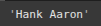
					print("Split names:", split_names)


					split_names[0]


					split_names[2]
				
			
#raw text explanation
#raw string -> not to handle backslashes in any way
#python prints same way its sepecified
				
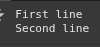
					non_raw_text = 'First line\nSecond line'


					print(non_raw_text)


					raw_text = r"First line\nSecond line"


					print(raw_text)


					text_with_tab = 'Column1\tColumn2\tColumn3'


					print(text_with_tab)


					raw_text_with_tab = r"Column1\tColumn2\tColumn3"


					print(raw_text_with_tab)
				
			
#Matching Characters
#.
##period matches any character minus new line backlsash
				
					pitcher = "Satchel Paige"


					re.findall(r".", pitcher)


					#starts with p, one character in middle, ends with a
#case sensative
re.findall(r"P.i", pitcher)


					#starts with s, two characters in middle, ends with c
#case sensative
re.findall(r"S.{3}h", pitcher)
				
			
#^: Matches the start of the string.
				
					re.findall(r"^.a", pitcher)


					#$: Matches the end of the string.
#end $
re.findall(r"ge$", pitcher)
				
			
#*: Matches 0 or more repetitions of the preceding character.
				
					text = "ab a abbb abbbb a a abb"


					re.findall(r"ab*", text)
				
			
#+: Matches 1 or more repetitions of the preceding character.
				
					re.findall(r"ab+", text)
				
			
#?: Matches 0 or 1 repetition of the preceding character.
				
					re.findall(r"ab?", text)


					satchel_mlb_years = "Satchel Paige played for the Indians in 1948 and 1949. Browns in 1951, 1952, and 1953."
				
			
#\d: Matches any digit (equivalent to [0-9]).
				
					re.findall(r"\d", satchel_mlb_years)


					re.findall(r"\d{4}", satchel_mlb_years)


					#\D: Matches any non-digit.
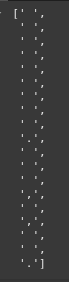
re.findall(r"\D", satchel_mlb_years)
				
			
#\w: Matches any word character (alphanumeric plus underscore).

#The dot (.) matches any single character except for newline characters.
#The \w matches any word character.

#\w doesnt include whitespace, punctuation, special characters
				
					re.findall(r"\w", satchel_mlb_years)
				
			
#\W: Matches any non-word character.
				
					re.findall(r"\W", satchel_mlb_years)
				
			
#\s: Matches any whitespace character.
				
					re.findall(r"\s", satchel_mlb_years)
				
			
#\S: Matches any non-whitespace character.
				
					re.findall(r"\S", satchel_mlb_years)
				
			
#\b beginning or at the end of a word/block
#B not at the beginning or end of a word/block
				
					satchel_mlb_years
				
			
# Find all words starting with ‘p’
##\w: Matches any word character (alphanumeric plus underscore).
				
					re.findall(r"\bp\w*", satchel_mlb_years)
				
			
# Find all words ending with ‘d’
				
					re.findall(r"\w*d\b", satchel_mlb_years)


					# Find all words containing r not at a word boundary
re.findall(r"\B\w*r\w*\B", satchel_mlb_years)
				
			
#[A-Z]
				
					re.findall(r"[A-Z]", satchel_mlb_years)


					re.findall(r"[A-C]", satchel_mlb_years)
				
			
#[a-z]
				
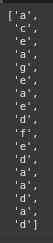
					re.findall(r"[a-g]", satchel_mlb_years)


					re.findall(r"[ae]", satchel_mlb_years)
				
			
#[0-9]
				
					re.findall(r"[0-9]", satchel_mlb_years)


					re.findall(r"[0-3]", satchel_mlb_years)


					re.findall(r"[15]", satchel_mlb_years)


					re.findall(r"[0-9]{4}", satchel_mlb_years)
				
			
# \. actual period \? actual question mark re.findall(“\.”, string)
				
					examples = "What is a question? This is text."


					re.findall(r"\.", examples)


					re.findall(r"\?", examples)
				
			
# | is either or re.findall(“|”, string)
				
					re.findall(r"\.|\?", examples)


					re.findall(r"[0-2]|[a-c]", satchel_mlb_years)
				
			
#re.compile & flags
#compile a regular expression pattern into a regular expression object,
#which can then be used for matching, searching, and other operations.
#re.compile(pattern, flags=0)

#pattern: The regular expression pattern you want to compile.
#flags: Optional argument to modify the behavior of the pattern matching.
#Examples of flags include re.IGNORECASE, re.MULTILINE, re.DOTALL, etc
#compilation flags
#ASCII
#DOTALL
#IGNORECARE
#LOCALE
#MULTILINE
#VERBOSE
				
					pattern = re.compile(r'\bstrikes\b')


					match = pattern.search("Bob Feller strikes out Ted Williams.")


					print(match.group())
				
			
#flags example Ignore Case
				
					pattern = re.compile(r'\bfeller\b', re.IGNORECASE)


					match = pattern.search("Bob Feller strikes out Ted Williams.")


					print(match.group())
				
			
#flags example Multiline Case
				
					pattern = re.compile(r'^Bob', re.MULTILINE)


					text = """Bob Gibson
Sandy Koufax
Tom Seaver
Bob Feller"""


					matches = pattern.findall(text)


					print(matches)
				
			
#flags Dotall
				
					pattern = re.compile(r'Koufax.*Tom', re.DOTALL)


					text = """Bob Gibson\nSandy Koufax\nTom Seaver\nBob Feller"""


					match = pattern.search(text)


					print(match.group())  # Output: first line\nsecond line
				
			
#Multiple flags example Ignore Case & multiline
				
					pattern = re.compile(r'^bob', re.IGNORECASE | re.MULTILINE)


					text = """Bob Gibson
Sandy Koufax
Tom Seaver
bob Feller"""


					matches = pattern.findall(text)


					print(matches)  # Output: ['Bob', 'bob']
				
			
#More Complicated Examples
				
					#Matching Email Addresses Ex 1
email_string = "Contact my email ryannolandata@gmail.com for freelance projects"


					pattern = r"\b\w+@\w+\.\w+\b"
#also works without the boundaries
				
			
#\w – any character
# @ – email
# .
# + one or more characters
#+: Matches 1 or more repetitions of the preceding character.
				
					re.findall(pattern, email_string)
				
			
#Matching Email Addresses Ex 2
				
					pattern2 = r"[a-zA-Z0-9_.+-]+@[a-zA-Z0-9-]+\.[a-zA-Z0-9-.]+"


					re.findall(pattern2, email_string)
				
			
#Matching Phone Numbers Ex 3
				
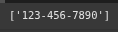
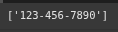
					phone_string = "Contact my phone number 123-456-7890 for freelance projects"


					pattern3 = r"[0-9]{3}-[0-9]{3}-[0-9]{4}"


					re.findall(pattern3, phone_string)
				
			
#Matching Phone Numbers Ex 4
				
					pattern4 = r"\b\d{3}-\d{3}-\d{4}\b"


					re.findall(pattern4, phone_string)
				
			
#Matching date Ex 5
				
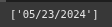
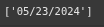
					date = "Today is 05/23/2024"


					pattern5 = r"[0-9]{2}/[0-9]{2}/[0-9]{4}"


					re.findall(pattern5, date)


					pattern6 = r"\d{2}/\d{2}/\d{4}"


					re.findall(pattern6, date)


Free Community

Join 1,000+ AI Automation Builders

Weekly tutorials, live calls & direct access to Ryan & Matt.

Join Free →

Keep Learning

Streamlit Async

Streamlit runs Python scripts top-to-bottom when ever a user interacts with widget.Streamlit is synchronous by default, meaning each function waits for the...

Streamlit Caching

Streamlit runs your script from top to bottom whenever you interact with the app.This execution model makes development super easy. But it...

Streamlit Tutorial

Streamlit can help businesses automate a ton of tasks in a short amount of time. It essentially is a quick UI you...

Gradient boosting classifier

Gradient Boosting is an ensemble technique that builds a strong model by combining multiple weak decision trees. While it may seem similar...