In the realm of machine learning and data science, preparing your data is often as crucial as the modeling itself. One of the essential preprocessing steps when working with categorical data is one-hot encoding.
This technique transforms categorical variables into a format that can be provided to machine learning algorithms to improve predictions and insights.
One-hot encoding is a method to convert these categorical labels into a binary matrix, where each column represents a unique category, and the presence of a category is marked by a 1, while all other columns are marked by 0.
One Hot Encoding with Pandas and scikit-learn
Start off by importing in Pandas and One Hot Encoder
import pandas as pd
from sklearn.preprocessing import OneHotEncoder
The code below will be used for our example of data that needs to be encoded. It’s a dictionary that we are going to convert into a dataframe through Pandas.
d = {'sales': [100000,222000,1000000,522000,111111,222222,1111111,20000,75000,90000,1000000,10000],
'city': ['Tampa','Tampa','Orlando','Jacksonville','Miami','Jacksonville','Miami','Miami','Orlando','Orlando','Orlando','Orlando'],
'size': ['Small', 'Medium','Large','Large','Small','Medium','Large','Small','Medium','Medium','Medium','Small',]}
Create the df by using the following code. Next, let’s take a look at the first 5 rows.
df = pd.DataFrame(data=d)
df.head()
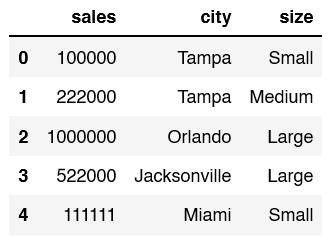
The goal in this article is to One Hot Encode the values for the size column.
The next line of code is creating and configuring an instance of the OneHotEncoder class from the sklearn.preprocessing module in scikit-learn
ohe = OneHotEncoder(handle_unknown='ignore', sparse_output=False).set_output(transform="pandas")
After creating the instance, apply it to the DataFrame (df), specifically to the ‘size’ column. This is done through the fit and transform operations.
ohetransform = ohe.fit_transform(df[['size']])
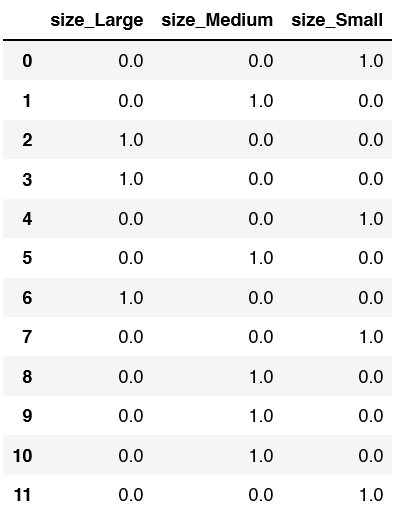
If you print out the new ohetransform dataframe, this is the results you will see.
It’s not super helpful so we still need to attatch it back to the original dataframe df.
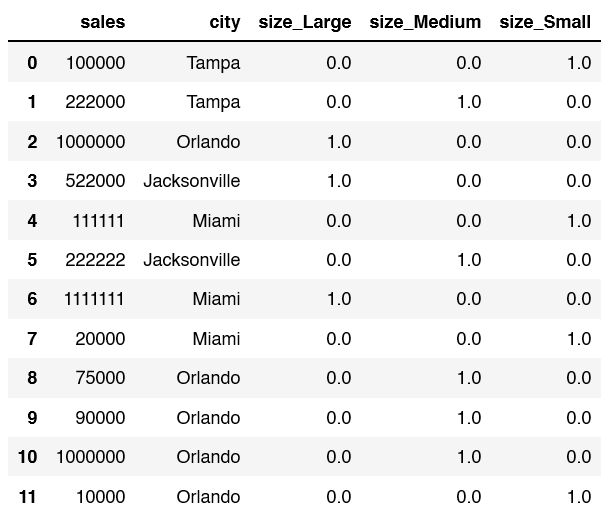
To create our final dataframe, let’s concat our original dataframe df and the new one we just created ohetransform. Since we just one hot encoded the size column, we can drop this from the new dataframe.
df = pd.concat([df,ohetransform],axis=1).drop(columns=["size"])
Let’s print out the new data frame: print(df)