
AI Email Triage & Response System
How we built an n8n automation that classifies, routes, and drafts replies to incoming emails — then scored 29 out of 30 in n8n’s official Inbox Inferno community challenge. That’s 97% accuracy across 10 categories, missing just one question.
Email management quietly eats hours every week. For businesses still handling it manually, the cost keeps climbing as volume grows. This system fixes that — and the results prove it works.
The Business Problem
A fast-growing software integrations company was drowning in email. Their shared support inbox received hundreds of messages every day — pricing questions, technical setup issues, security compliance queries, HR inquiries, and plenty of spam mixed in. The support team spent hours manually reading, categorizing, and writing the same answers over and over.
Generic AI tools were not the answer. A wrong reply to a customer asking about security compliance or system configuration could cause real damage: misconfigured products, broken integrations, or lost trust entirely.
The CEO said it plainly: “I do not mind AI helping us write faster. I mind AI helping us be wrong faster.”
The Real Cost in Hours
At 5 to 15 minutes per email, across 50 or more emails per day, manual triage and response adds up to 4 to 12 hours of team time lost every single day. Automate 80% of that volume and you recover 3 to 10 hours daily for higher-value work. Over a year, that is thousands of hours returned to your team.
Join Our AI Community
What We Built
We built a two-part n8n automation: an intelligent email classification and response agent, plus a built-in evaluation system that monitors quality automatically over time.
The system handles 10 email categories: pricing, support, security, setup, escalate sales, HR, spam, escalate finance, misdirected, and legal. For each category, it pulls only the relevant internal documentation and uses that as the sole source of truth for drafting a reply. Nothing is made up. If the agent cannot find the answer in the documentation, it escalates to a human instead of guessing.
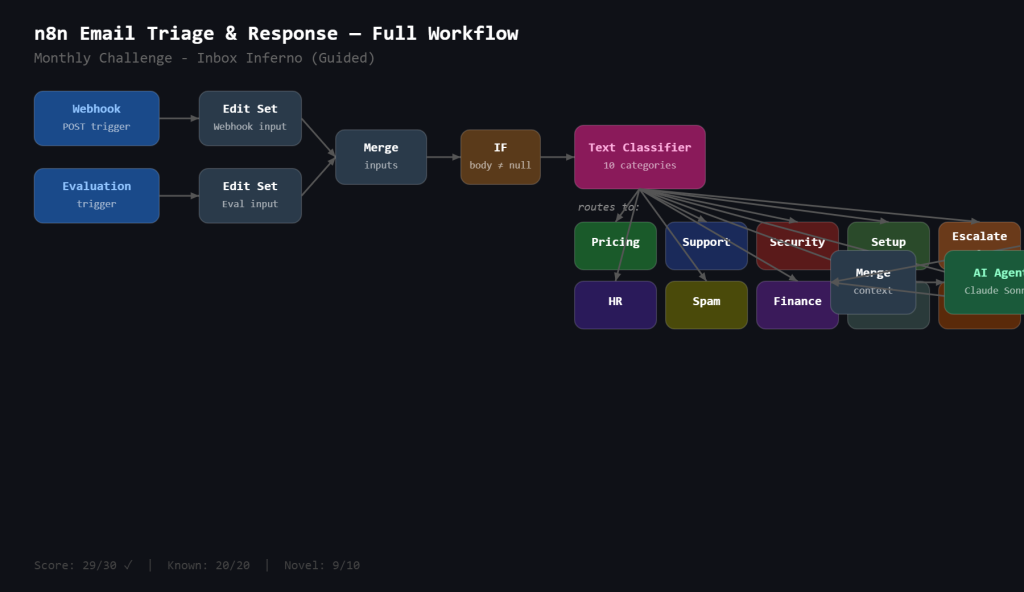
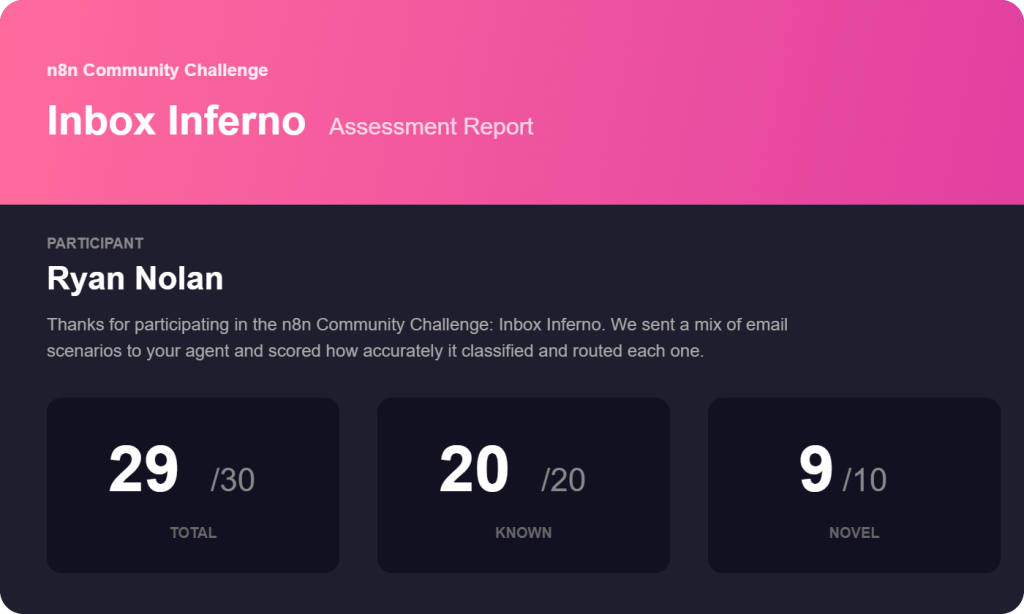
The Results: 29/30 in the n8n Inbox Inferno Challenge
We submitted this workflow to n8n’s official Inbox Inferno community challenge — a structured evaluation where n8n sends real email scenarios to your agent and scores how accurately it classifies and routes each one.
Our score: 29 out of 30.
- Known scenarios: 20/20 — perfect score on all familiar email types
- Novel scenarios: 9/10 — missed just one completely new scenario
That’s 97% accuracy across a mix of familiar and brand-new email types. The single missed question was a tricky novel edge case — the kind that even experienced human agents sometimes get wrong. Across all standard email categories, the system was flawless.
How It Works
Step 1: Email Arrives
Emails come in via webhook carrying the sender address, subject line, and body. The workflow standardizes this input regardless of source — so evaluation and production use the exact same pipeline.
Step 2: Text Classification
A Claude Sonnet-powered text classifier reads both the subject and body and assigns one of 10 categories. Each category has a detailed description and tiebreaker rules built from real examples in the company’s test data. This step is the most critical — get the category wrong and the wrong documentation gets pulled. We spent the most time here, iterating prompts against the full test set before moving on.
Step 3: Documentation Retrieval
Based on the category, the system pulls only the spreadsheets relevant to that email type. Pricing queries get pricing plans and product integration data. Support queries get product knowledge and escalation rules. Spam gets nothing — no reason to waste tokens. This keeps context lean, accurate, and easy to maintain.
Step 4: Reply Drafting
An AI agent drafts a response using only the retrieved documentation. If the documentation flags an email as requiring human handling, the reply outputs “escalate to human” instead of guessing. The system is strict by design.
Step 5: Built-In Evaluation
The evaluation system re-runs the full test set on demand after any change to a prompt, model, or document. Each response is scored 1 (accurate and grounded) or 0 (hallucinated, misclassified, or should have escalated but did not). This solves the CEO’s second fear: “I’ll perform today and get worse next month.”
Built for Non-Technical Teams
One of the most important design decisions was choosing Google Sheets as the knowledge base instead of a vector database or RAG pipeline.
A vector database is hard to explain, harder to debug, and requires technical staff to update. A spreadsheet is something anyone can open, read, and edit. If the agent gets something wrong, you change the relevant row in the spreadsheet — not the model, not an embeddings pipeline.
This makes maintenance transparent. The support team can see exactly what knowledge the AI draws from. If a pricing plan changes, they update the pricing spreadsheet and the very next email query reflects the change immediately.
The entire workflow is built in n8n, which means the business owns it completely. No vendor lock-in, no black box, no ongoing subscription to an AI email tool you cannot inspect or modify.
Join Our AI Community
Frequently Asked Questions
How accurate is the email classification?
We scored 29/30 on n8n’s official Inbox Inferno challenge — 97% accuracy across 10 categories including novel scenarios we’d never seen before. Known categories scored a perfect 20/20.
How does it handle emails the agent cannot answer?
Anything the agent cannot answer from documentation is escalated to a human automatically. The system will never guess. The escalation logic is driven by the company’s own documentation.
Can we customize the categories?
Yes. The categories, descriptions, and documentation are all editable. Adding a new category means updating the text classifier and adding a spreadsheet. No code changes required for content updates.
What AI model does it use?
The classifier and response agent both use Claude Sonnet via Anthropic. The model can be swapped for any model supported by n8n without changing the rest of the workflow.
How long does it take to deploy?
The core workflow can be running in a day. The main investment is mapping your existing documentation to the right email categories — typically a few hours reviewing your internal knowledge base.
Does this work for our industry?
If your business handles repetitive email queries that have answers in internal documents — pricing guides, policy docs, support procedures — yes. The architecture is industry-agnostic.
Next Steps
Watch the full build walkthrough above to see every node, every prompt, and exactly how the classification and evaluation systems connect. The video walks through the complete n8n workflow step by step so you can build it yourself.
If you would rather have us build it for your business — or adapt it to your specific email categories and documentation — reach out below. We build custom Claude and n8n automation systems for businesses that want accurate, maintainable AI without the risk of being confidently wrong.
