
#Python supports the object-oriented programming paradigm through classes
#class is like the blueprint for a house
#create several houses and even a complete neighborhood. Each concrete house is an object or instance that’s derived from the blueprint
#Each instance can have its own properties, such as color, owner, and interior design
#properties carry what’s commonly known as the object’s state
#Instances can also have different behaviors, such as locking the doors
# In Python, attributes are variables defined inside a class with the purpose of storing all the required data for the class to work.
#Methods are functions that you define within a class
#Attributes and methods are collectively referred to as members of a class or object
#Finally, you can use classes to build class hierarchies. This way, you’ll promote code reuse and remove repetition throughout your codebase.
					class ClassName:
      #classbody
      pass
					#As an example of how to define attributes and methods, say that you need a Circle class to model different circles in a drawing application.
#Initially, your class will have a single attribute to hold the radius. It’ll also have a method to calculate the circle’s area:
#In Python, the first argument of most methods is self
#This argument holds a reference to the current object so that you can use it inside the class

import math

class Circle:
  def __init__(self, radius): #This method is known as the object initializer because it defines and sets the initial values for your attributes
    self.radius = radius

  def calculate_area(self):
    return round(math.pi * self.radius **2, 2) #this is a method
#The action of creating concrete objects from an existing class is known as instantiation.
# In Python, the class constructor accepts the same arguments as the .__init__() method. In this example, the Circle class expects the radius argument
					circle_1 = Circle(42)
circle_2 = Circle(7)
circle_1

#Accessing Attributes and Methods
#obj.attribute_name
#obj.method_name()
circle_1.radius

circle_1.calculate_area()

circle_1.radius = 100
circle_1.radius

#Public vs Non-Public Members
#In Python, all attributes are accessible in one way or another.
#Public Use the normal naming pattern. radius, calculate_area()
#Non-public Include a leading underscore in names. _radius, _calculate_area()
#https://realpython.com/python-classes/
#Name Mangling
#add two leading underscores to attribute and method names. This naming convention triggers what’s known as name mangling.
#In other words, mangled names aren’t available for direct access. They’re not part of a class’s public API.
					class SampleClass:
     def __init__(self, value):
         self.__value = value
     def __method(self):
         print(self.__value)
sample_instance = SampleClass("Hello!")
vars(sample_instance)

vars(SampleClass)

					#both of these error out:
sample_instance.__value
sample_instance.__method()
#In this class, .__value and .__method() have two leading underscores, so their names are mangled to ._SampleClass__value and ._SampleClass__method()
#Because of this internal renaming, you can’t access the attributes from outside the class
					#correct way to do it
sample_instance._SampleClass__value
sample_instance._SampleClass__method()

#Classes are the building blocks of object-oriented programming in Python.
#In short, Python classes can help you write more organized, structured, maintainable, reusable, flexible, and user-friendly code.
#Class attributes: A class attribute is a variable that you define in the class body directly.
#All the objects that you create from a particular class share the same class attributes with the same original values.
#f you change a class attribute, then that change affects all the derived objects.
					class ObjectCounter:
     num_instances = 0
     def __init__(self):
         ObjectCounter.num_instances += 1
         #type(self).num_instances += 1
ObjectCounter()

ObjectCounter.num_instances

#Instance attributes: An instance is a variable that you define inside a method. Instance attributes belong to a concrete instance of a given class
					class Car:
    def __init__(self, make, model, year, color):
        self.make = make
        self.model = model
        self.year = year
        self.color = color
        self.started = False
        self.speed = 0
        self.max_speed = 200
toyota_camry = Car("Toyota", "Camry", 2022, "Red")
toyota_camry.make

toyota_camry.speed

ford_mustang = Car("Ford", "Mustang", 2022, "Black")
ford_mustang.make

#dict attribute
#In Python, both classes and instances have a special attribute called .__dict__. This attribute holds a dictionary containing the writable members of the underlying class or instance.
					class SampleClass:
    class_attr = 100

    def __init__(self, instance_attr):
        self.instance_attr = instance_attr

    def method(self):
        print(f"Class attribute: {self.class_attr}")
        print(f"Instance attribute: {self.instance_attr}")
SampleClass.class_attr

SampleClass.__dict__

SampleClass.__dict__["class_attr"]

					instance = SampleClass("Hello!")
instance.instance_attr
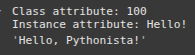
instance.method()
instance.__dict__
instance.__dict__["instance_attr"]
instance.__dict__["instance_attr"] = "Hello, Pythonista!"
instance.instance_attr
#Dynamic Class and Instance Attributes
					class Record:
     """Hold a record of data."""
					john = {
     "name": "John Doe",
     "position": "Python Developer",
     "department": "Engineering",
     "salary": 80000,
     "hire_date": "2020-01-01",
     "is_manager": False,
 }
					john_record = Record()

for field, value in john.items():
     setattr(john_record, field, value)

john_record.name
'John Doe'
john_record.department
'Engineering'

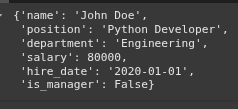
john_record.__dict__
{
    'name': 'John Doe',
    'position': 'Python Developer',
    'department': 'Engineering',
    'salary': 80000,
    'hire_date': '2020-01-01',
    'is_manager': False
}
					class User:
     pass

# Add instance attributes dynamically
jane = User()
jane.name = "Jane Doe"
jane.job = "Data Engineer"
jane.__dict__
{'name': 'Jane Doe', 'job': 'Data Engineer'}

# Add methods dynamically
def __init__(self, name, job):
     self.name = name
     self.job = job

User.__init__ = __init__

User.__dict__

linda = User("Linda Smith", "Team Lead")
linda.__dict__

#you’ve just used a pass statement as a placeholder, which is Python’s way of doing nothing.
#Even though this capability of Python may seem neat, you must use it carefully because it can make your code difficult to understand and reason about.
					#validate the radius to ensure that it only stores positive numbers. How would you do that without changing your class interface?
#The quickest approach to this problem is to use a property and implement the validation logic in the setter method.

import math

class Circle:
    def __init__(self, radius):
        self.radius = radius


    #To turn an existing attribute like .radius into a property, you typically use the @property decorator to write the getter method
    # The getter method must return the value of the attribute. In this example, the getter returns the circle’s radius, which is stored in the non-public ._radius attribute.
    @property
    def radius(self):
        return self._radius

    @radius.setter
    def radius(self, value):
        if not isinstance(value, int | float) or value <= 0:
            raise ValueError("positive number expected")
        self._radius = value

    def calculate_area(self):
        return round(math.pi * self._radius**2, 2)
					circle_1 = Circle(100)
circle_1.radius

circle_1.radius = 0
circle_2 = Circle(-100)
					class Square:
    def __init__(self, side):
        self.side = side

    @property
    def side(self):
        return self._side

    @side.setter
    def side(self, value):
        if not isinstance(value, int | float) or value <= 0:
            raise ValueError("positive number expected")
        self._side = value

    def calculate_area(self):
        return round(self._side**2, 2)
class PositiveNumber:
    def __set_name__(self, owner, name):
        self._name = name

    def __get__(self, instance, owner):
        return instance.__dict__[self._name]

    def __set__(self, instance, value):
        if not isinstance(value, int | float) or value <= 0:
            raise ValueError("positive number expected")
        instance.__dict__[self._name] = value

class Circle:
    radius = PositiveNumber()

    def __init__(self, radius):
        self.radius = radius

    def calculate_area(self):
        return round(math.pi * self.radius**2, 2)

class Square:
    side = PositiveNumber()

    def __init__(self, side):
        self.side = side

    def calculate_area(self):
        return round(self.side**2, 2)
circle = Circle(100)
circle.radius = 0
#https://realpython.com/python-classes/
#time to watch youtube videos
