
Table of Contents

The where() function in Pandas is used to replace values in a DataFrame or Series where a condition is not met. 

It is used to check a data frame for one or more conditions and return the result.

To start with we import pandas and numpy

To start we’re going to import two essential Python libraries.

Pandas

numpy

				
					import pandas as pd
import numpy as np


Next we create a panadas DataFrame named df with a single column, “Hourly_SALARY”, containing salary values as strings and one missing value as nan

				
					df = pd.DataFrame({
    'Hourly_Salary': ['500.00', '10000.00', '200.00', '20.00', np.nan]
})


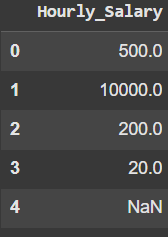
Then we convert the “Hourly_Salary” column from strings to numeric values, allowing for mathematical operations and handling of missing data(NaN)

				
					df['Hourly_Salary'] = pd.to_numeric(df['Hourly_Salary'])


					df


Example 1

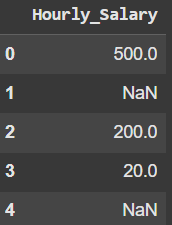
In this example we filter the DataFrame by keeping only the values less than 1000; values not meeting the condition are replaced with NaN

				
					filtered_df = df.where(df < 1000)


					filtered_df


Example 2

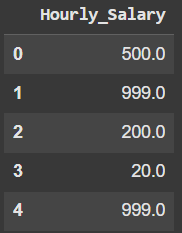
This example filters the DataFrame by replacing values greater than or equal to 1000 witjh 999, while keeping values less than 1000 unchanged

				
					filtered_df_2 = df.where(df < 1000, other=999)


					filtered_df_2


Example 3

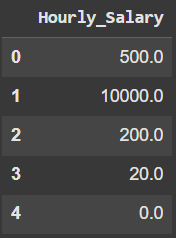
In this example we are replacing all NaN(missing) values in the DataFrame with 0, leaving all non-null values unchanged

				
					df_where_3 = df.where(df.notnull(), 0)


					df_where_3


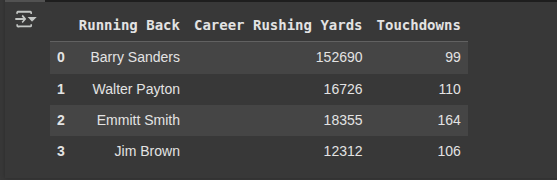
Here, we are creating another DataFrame with columns “Running Back”, “Career Rusing Yards” and “Touchdowns”.

				
					df2 = pd.DataFrame({
    'Running Back': ['Barry Sanders', 'Walter Payton', 'Emmitt Smith', 'Jim Brown'],
    'Career Rushing Yards': [152690, 16726, 18355, 12312],
    'Touchdowns': [99, 110, 164, 106]
})


					df2


Example 4

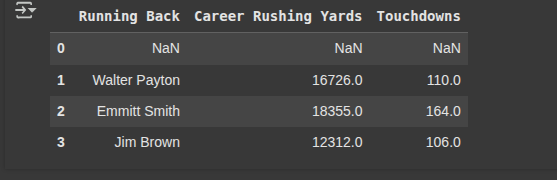
Next, we filter the DataFrame (df2) to keep only the rows where the Career Rusing Yards are less than 100,000, rows that dont meet this condition are filled with NaN

				
					df2.where(df2["Career Rushing Yards"] < 100000)


Example 5

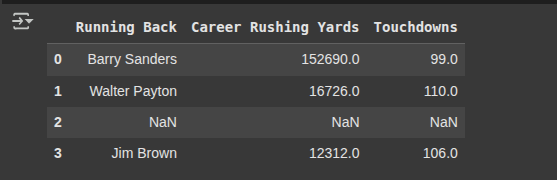
In this example, we keep rows where Touchdowns are at least 99 and Career Rushing Yards are not equal to 18,355. All other rows are replaced with NaN

				
					df2.where((df2["Touchdowns"] >= 99) & (df2["Career Rushing Yards"] != 18355))


Example 6

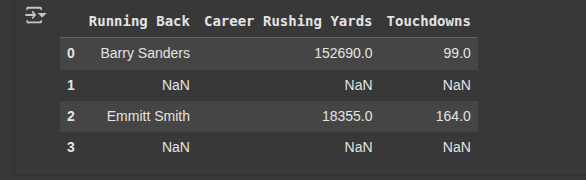
Here we create a boolean filter that marks True for players with fewer than 100 touchdowns and False otherwise

				
					filter1 = df2["Touchdowns"] < 100


Here we create a boolean filter that marks True for players with Touchdowns greater than 150 and False otherwise.

				
					filter2 = df2["Touchdowns"] > 150


Then we filter then DataFrame(df) to keep rows where either filter1 or filter2 is True. Rows not matching these conditions are replaced with NaN

				
					df2.where(filter1 | filter2)


Example 7

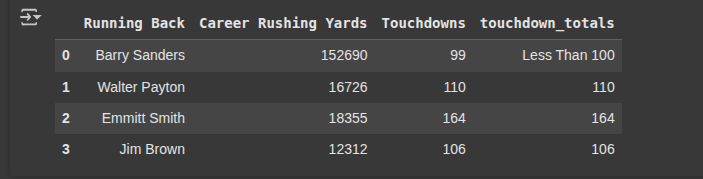
Here we create a new column “touchdown_totals” in df2 that shows the original touchdown count if it’s 100 or more, otherwise it labels the values as “Less Than 100”

				
					df2["touchdown_totals"] = df2["Touchdowns"].where(df2["Touchdowns"] >= 100, other="Less Than 100")


					df2


Free Community

Join 1,000+ AI Automation Builders

Weekly tutorials, live calls & direct access to Ryan & Matt.

Join Free →

Keep Learning

Python Pandas Data Cleaning

https://youtu.be/iaZQF8SLHJs https://www.espncricinfo.com/records/highest-career-batting-average-282910 Here, we read the CSV file names 'CricketTestMatchData.csv' into a DataFrame called df using the read_csv. Here, we check for...

Pandas Columns

Pandas Dataframes are composed of Rows and Columns. In this guide we are going to cover everything you need to know about...

Pandas Resample

The .resample() method in pandas works similarly to .groupby(), but it is specifically designed for time-series data. It groups data into defined...

Python Pandas JSON

JSON (JavaScript Object Notation) is a lightweight, human-readable data interchange format that is widely used for both data storage and transfer. It...